Working from home as a truck dispatcher is becoming an attractive option for people interested in the US trucking and logistics industry. With a computer, a reliable internet connection, and the right software, dispatchers can manage loads, communicate with drivers, coordinate with freight brokers, and organise paperwork from a home office.
However, working remotely requires good organisation. The right truck dispatching tools can help you save time, manage daily tasks, and handle multiple loads more efficiently.
In this guide, we will explore the essential tools for home-based truck dispatching professionals and explain how beginners can get started.
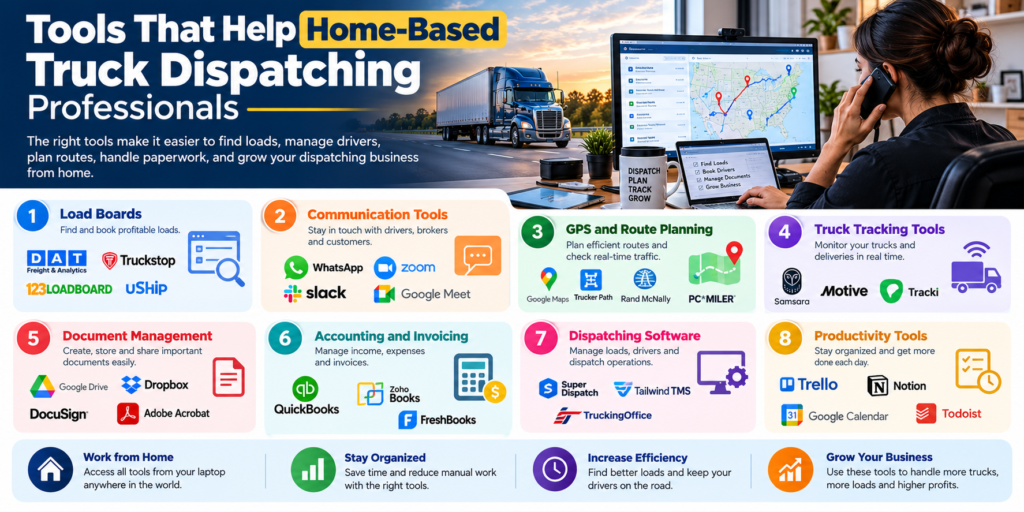
1. Load Board Software
Load boards are among the most important tools for truck dispatchers. They help dispatchers search for available freight and find loads that match a truck’s location, equipment, and schedule.
Popular US freight load boards include DAT and Truckstop. Dispatchers should compare available features, subscription costs, and access requirements before choosing a platform.
Load boards can help you:
- Find available loads for trucks.
- Compare freight rates and routes.
- Check pickup and delivery details.
- Identify loads that match specific equipment.
- Research market rates where data is available.
For a home-based dispatcher, learning to search and compare loads effectively is an important first step.
2. Transportation Management System (TMS)
A Transportation Management System, commonly called a TMS, helps organise dispatching operations in one place.
Instead of managing every detail through separate messages and spreadsheets, dispatchers can use a TMS to track loads, assign trucks, manage documents, and monitor shipment progress.
Depending on the software, useful features may include:
- Load and driver management.
- Pickup and delivery scheduling.
- Shipment status tracking.
- Document storage.
- Invoicing and reporting.
Beginners working with one or two trucks may be able to start with a well-organised spreadsheet. A dedicated TMS can become useful as the business grows.
3. Communication Tools
Communication is a major part of truck dispatching. Dispatchers regularly speak with drivers, freight brokers, and other transportation professionals.
Home-based dispatchers can use professional phone services, email, and messaging applications to stay connected.
Useful communication tools include:
- Business phone or VoIP: For professional calls with brokers and drivers.
- Gmail or Microsoft Outlook: For load details, rate confirmations, and business emails.
- WhatsApp or other messaging apps: For suitable driver updates and quick communication.
- Video meeting tools: For remote meetings and team discussions when needed.
Using a dedicated business phone number and professional email address helps keep work communication separate from personal matters.
4. GPS and Route Planning Tools
GPS and route-planning tools help dispatchers understand routes, estimate travel times, and coordinate pickup and delivery schedules.
Google Maps can be useful for general location research and route planning. However, dispatchers must remember that ordinary navigation tools may not account for every commercial truck restriction.
For truck-specific routing, tools such as Trucker Path or other suitable commercial navigation systems may be helpful.
Dispatchers should consider:
- Distance between pickup and delivery locations.
- Estimated driving time.
- Traffic and weather conditions.
- Truck restrictions and road suitability.
- Delivery appointment times.
Accurate route planning helps dispatchers communicate realistic schedules to drivers and brokers.
5. Spreadsheet and Load Tracking Tools
Spreadsheets are a practical starting point for people who are new to home-based truck dispatching.
Google Sheets and Microsoft Excel can help you maintain load records without immediately investing in complicated software.
You can create a spreadsheet with columns for:
- Load number.
- Driver and truck details.
- Broker name and contact information.
- Pickup and delivery locations.
- Freight rate and estimated miles.
- Pickup and delivery dates.
- Current load status.
- Documents received and pending tasks.
A well-maintained spreadsheet makes it easier to check load progress and follow up on missing information.
6. Document Management Tools
Truck dispatchers handle important documents throughout the transportation process. These may include rate confirmations, bills of lading (BOLs), proof of delivery (POD), invoices, and carrier paperwork.
Cloud storage tools such as Google Drive and Microsoft OneDrive help organise documents and access them remotely.
Create a separate folder for each load and use clear file names. This makes it easier to find documents when a broker requests an update or a carrier needs paperwork.
Always review documents carefully before sending them. Make sure the rates, addresses, dates, and shipment details are correct.
7. Freight Rate Research Tools
Choosing the right load involves more than looking at the total payment. Dispatchers should understand the relationship between freight rates, route distance, operating costs, and available market information.
Rate research tools, including market data offered by load boards, can help dispatchers compare rates for specific routes.
For example, a dispatcher may compare two loads with different payments and distances. The load offering more money may not be the better option if it involves significantly more miles or an expensive return trip without freight.
Consider these factors when evaluating loads:
- Rate per mile.
- Empty miles before pickup.
- Estimated trip duration.
- Carrier operating costs.
- Delivery timing and the possibility of finding another load.
Use available market data to support negotiations rather than relying on guesswork alone.
8. Broker Verification Tools
Before working with a freight broker, it is important to check the broker’s identity and business credentials.
For US transportation businesses, the Federal Motor Carrier Safety Administration (FMCSA) provides the SAFER System and other resources for checking relevant company information. Additional commercial verification services may provide credit or payment-history information.
Verification tools can help dispatchers review:
- Company identity and operating information.
- Relevant authority and registration details.
- Available credit or payment information.
- Potential warning signs before accepting a load.
No single check guarantees that a broker will pay on time. Follow the carrier’s procedures and verify important details before committing to a shipment.
9. Accounting and Invoicing Tools
Dispatching also involves keeping track of payments, invoices, and business expenses.
Accounting tools can help trucking businesses organise their financial records and monitor outstanding invoices.
Depending on the business arrangement, dispatchers may need to prepare load records, track agreed dispatch fees, or help organise paperwork for carrier invoicing.
Tools such as QuickBooks or other suitable accounting software can support these tasks. The right choice depends on the business size and accounting requirements.
Keep clear records of the services provided, agreed fees, and documents associated with each load.
10. A Reliable Home Office Setup
Software alone is not enough. Home-based truck dispatching professionals also need a dependable working environment.
A basic home office should include:
- A computer or laptop with suitable performance.
- A stable internet connection.
- A headset for clear phone conversations.
- A quiet place to work.
- A backup internet option where practical.
- Secure passwords and appropriate data protection.
Since many US dispatching roles follow US business hours, people working from India should also plan their sleep schedule and working hours carefully.
Which Tools Should Beginners Use First?
If you are just starting, you do not need to purchase every tool at once. Begin with the essentials and add more software as your workload increases.
A simple starting setup includes:
- A computer and reliable internet connection.
- Professional email and phone communication.
- A spreadsheet for tracking loads.
- A suitable load board subscription with authorised access.
- A cloud storage system for documents.
- Basic route planning and broker verification resources.
Once you start managing more trucks or loads, consider a TMS, specialised rate analysis, and accounting software.
Remember that some tools are free, while load boards and professional dispatching platforms may require paid subscriptions. Check current prices and account requirements before purchasing.
Frequently Asked Questions
What tools do home-based truck dispatchers use?
Home-based truck dispatchers commonly use load boards, dispatching software, spreadsheets, business phone services, email, route-planning tools, and document management systems.
Can I do truck dispatching from home?
Yes. Many dispatching tasks can be performed remotely with a suitable computer, reliable internet, professional communication tools, and authorised access to the required freight platforms.
Do I need to buy load board software?
If your work involves searching for freight on paid load boards, you may need a subscription or access provided by an employer or carrier. Check each platform’s terms and eligibility requirements before signing up.
Is truck dispatching software necessary for beginners?
Not always. Beginners managing a small number of loads can start with spreadsheets and basic communication tools. Specialised software becomes more useful when manual tracking takes too much time.
Can I work as a truck dispatcher from India for US trucking companies?
Yes, some employers and dispatching businesses offer remote opportunities to people in India. You will need relevant industry knowledge, clear English communication, suitable working hours, and the ability to use the tools required by the employer.
Conclusion
The right tools make home-based truck dispatching easier to organise and manage. Load boards help find freight, spreadsheets and TMS platforms track loads, communication software connects dispatchers with drivers and brokers, and document management tools keep important records organised.
If you are a beginner, start with the basics and learn how each tool fits into the dispatching process. As you gain experience, you can invest in more advanced software to improve your workflow.
Successful home-based truck dispatching depends on using the right tools, communicating professionally, and keeping every load organised from booking to delivery.